
← Armidale, Tamworth & New England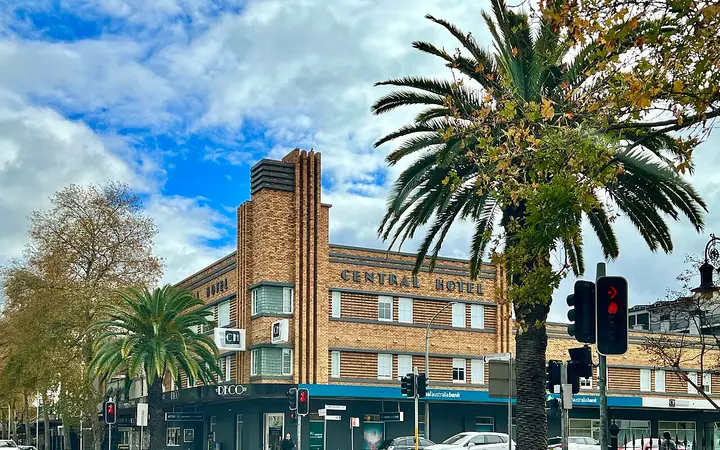


 Spin the date wheel instead →
Date ideas in Tamworth
15 date ideas around Tamworth, from the new Skywalk to Oxley Lookout and rooftop music at The Tudor to the Country Music Festival, the Hands of Fame and a telescope night at the Astronomy and Science Centre. Swipe through them above, or browse every one below. Each was checked on the place's own website: what it is, when it's on and what it costs. 4 are free.
Every date idea in Tamworth, by kind
15
ideas
4
free
5
kinds
Sep 2026
last checked
Shows and music: 5 date ideas in Tamworth
The Central Hotel on Peel Street, home of DECO. Photo: Kgbo · CC BY-SA 4.0 · Wikimedia Commons ↗
TAMWORTH
DECO dinner, then a show at the Capitol
Book a show at the Capitol Theatre or Town Hall and add DECO's three-course pre-show menu, served in CH Boutique Hotel's restored Peel Street heritage wing with its timber-panelled bar. The theatre is a short stroll across the road.
When Seven days, not public holidays, where show times permit. Dinner service from 5:30pm (lunch from 11:30am); allow at least an hour before the show
Cost Ticketed; the dinner deal is priced when you add it to your show tickets. DECO à la carte mains $27 to $42, grills $38 to $65 (when checked); 10% surcharge Sundays and public holidays
Checked on the official website, 30 Sep 2026
TAMWORTH
Rooftop drinks and free live music at The Tudor
The Tudor on Peel Street has Tamworth's only rooftop bar, then free live local music every Friday and Saturday night from 9pm. Book a bistro dinner first and make a night of it.
When Rooftop Thursday to Saturday from 5pm (Saturdays from 11:30am); live music Friday and Saturday from 9pm; bistro dinner daily 5:30pm to 9pm
Cost Live music free; $14 cocktails Thursdays and Fridays 5:30pm to 8:30pm (offer when checked, September 2026)
Checked on the official website, 30 Sep 2026
A free stage at the Tamworth Country Music Festival. Photo: Seeneyj · CC BY-SA 3.0 · Wikimedia Commons ↗
TAMWORTH
Free concerts at the Tamworth Country Music Festival
The Toyota Country Music Festival runs for ten days from 15 to 24 January 2027. Spend the day at the free FanZone on the corner of Peel and Fitzroy Streets, where around 170 performances run across the festival, then catch the free Concerts in the Park each night.
When 15 to 24 January 2027: FanZone daily from 9am, performances until 8pm; Concerts in the Park nightly from 7pm
Cost Free (FanZone and Concerts in the Park); other shows ticketed
Checked on the official website, 30 Sep 2026
TAMWORTH
Country music history, then the Hands of Fame
The Australian Country Music Hall of Fame, including Walk a Country Mile, holds a collection of stage outfits, instruments and memorabilia telling Tamworth's musical story. Afterwards, find the Hands of Fame Cornerstone, where country stars have pressed their hands in cement since 1977.
When Museum Tuesday to Sunday 10am to 4pm, closed Mondays and public holidays; Hands of Fame viewable all year
Cost $10 each; Hands of Fame free
Checked on the official website, 30 Sep 2026
On stage at the Capitol Theatre. Photo: Jetty Road · CC BY-SA 3.0 · Wikimedia Commons ↗
TAMWORTH
The Addams Family musical at the Capitol Theatre
Tamworth Musical Society stages The Addams Family, the musical comedy in which Wednesday falls for a boy from Ohio and his parents come to dinner. Expect big laughs, catchy songs and passionate tangoes; it is a dark comedy rated 8+.
When 30 October to 14 November 2026; session times on the booking page
Cost Ticketed; prices on the show's page
Checked on the official website, 30 Sep 2026
For couples: 4 date ideas in Tamworth
TAMWORTH EAST
Telescope night at the Astronomy and Science Centre
The Tamworth Regional Astronomy Club opens its centre in Victoria Park to the public, with a planetarium theatre, interactive displays and some of the largest publicly accessible telescopes in Australia, including the 34-inch Hewitt Camera. Come on a Thursday evening and stay until dark for telescope viewing.
When Thursday evenings from 6pm (viewing once dark, around 7 to 8pm in summer); Saturdays 10am to 1pm for displays and solar telescope viewing; monthly community nights usually on the first Saturday at 6pm (not January). Viewing depends on the weather
Cost $10 each
Checked on the official website, 30 Sep 2026
TAMWORTH
The Tamworth Textile Triennial at the Regional Gallery
Nature Machine, the 6th Tamworth Textile Triennial, gathers leading and emerging Australian textile artists working between hand, body and machine, from grown and recycled fibres to AI. The gallery calls the Triennial the most important platform for contemporary textile practice in the country; see it here before it tours.
When Until 22 November 2026; Tuesday to Sunday 10am to 4pm, closed public holidays
Cost Free
Checked on the official website, 30 Sep 2026
TAMWORTH
Steam engines at the Tamworth Powerstation Museum
In 1888 Tamworth became the first city in Australia lit by municipal electric street lighting, and this museum on the original site tells the story; when it opened in 1988 it was Australia's only dedicated electrical museum. Its two John Fowler steam engines are run during the Country Music Festival and at intervals through the year.
When Wednesday to Saturday, 9am to 1pm; closed public holidays
Cost $7 each
Checked on the official website, 30 Sep 2026
TAMWORTH
A few games at Tamworth Tenpins
Tenpin bowling upstairs in Centrepoint on Peel Street, with an arcade and a fully licensed café and bar. Loser buys the drinks.
When Every day from 9:30am until late; book a lane online
Cost $15.50 each for one game, $27 for two, $39 for three
Checked on the official website, 30 Sep 2026
Food and drink: 3 date ideas in Tamworth
TAMWORTH
Share plates at The Pig & Tinder Box
The Pig fills Tamworth's heritage-listed old bank building on Peel Street, serving modern Australian share plates with European and Asian influences, house-made pizzas and larger mains, alongside a cocktail list, craft beers and a long wine list.
When Every day, 12pm until late
Cost Starters $15 to $29, pizzas $30 to $32, mains $42 to $62 (when checked); 10% surcharge Sundays and public holidays
Checked on the official website, 30 Sep 2026
TIMBUMBURI
Dinner at the Glasshouse, Goonoo Goonoo Station
About 25 minutes south of Tamworth, the Glasshouse restaurant sits in Goonoo Goonoo Station's restored 19th-century village and has held an Australian Good Food Guide Chef's Hat. Order from the seasonal menu or ask for the tasting menu for the table.
When Dinner Monday to Saturday from 5:30pm; lunch Friday to Sunday 12pm to 2:30pm; book online
Cost Entrées $29, mains $49 to $59, desserts $20; tasting menu $80 each, dessert $15 extra (winter menu, when checked); 15% surcharge on public holidays
Checked on the official website, 30 Sep 2026
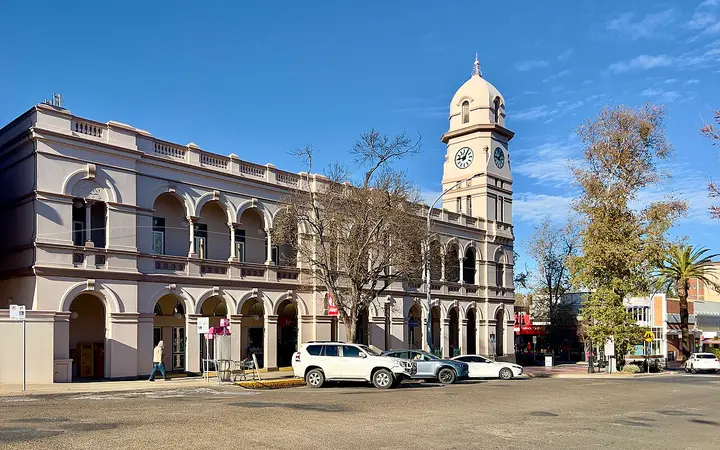
Peel Street's post office clock tower, on the market strip. Photo: Chris Olszewski · CC BY-SA 4.0 · Wikimedia Commons ↗
TAMWORTH
Sunday morning at the Peel Street Markets
Once a month more than 60 stalls line Peel Street, run by Calala Rotary since the markets began in 1996: cakes and breads, jams and honey, plants, pottery and handmade crafts. Browse, taste and grab a coffee in town.
When Third Sunday of every month, 8am to 1pm
Cost Pay as you go at each stall
Checked on the official website, 30 Sep 2026
Views and climbs: 2 date ideas in Tamworth
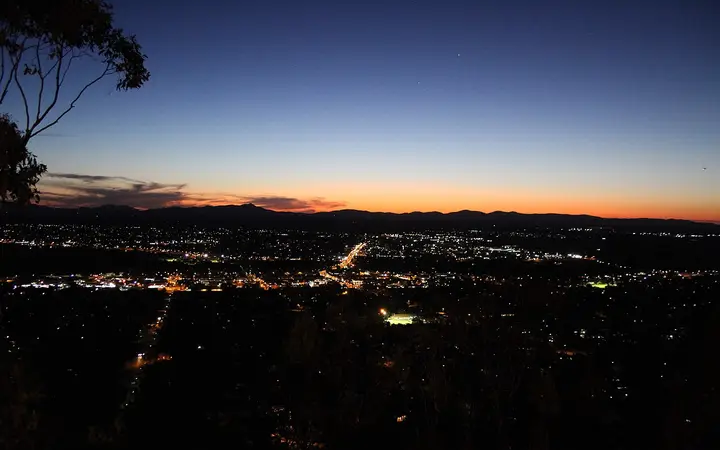
Dusk over Tamworth from Oxley Lookout, the top of the Skywalk. Photo: Connormill72 · CC BY-SA 4.0 · Wikimedia Commons ↗
TAMWORTH EAST
Walk the new Tamworth Skywalk up to Oxley Lookout
Opened in August 2026, the Skywalk is a 1.5 km path and elevated boardwalk that climbs 122 metres from Endeavour Drive to Oxley Scenic Lookout, with three viewing platforms on the way. Time it for sunset: the lookout's near-180-degree view takes in the city and the Peel River Valley, and the Skywalk is lit for the walk back down.
When Open 24 hours, every day; about 45 minutes return. Scenic Road is closed to cars 10pm to 6am, so after dark start from the Endeavour Drive entry
Cost Free
Checked on the official website, 30 Sep 2026
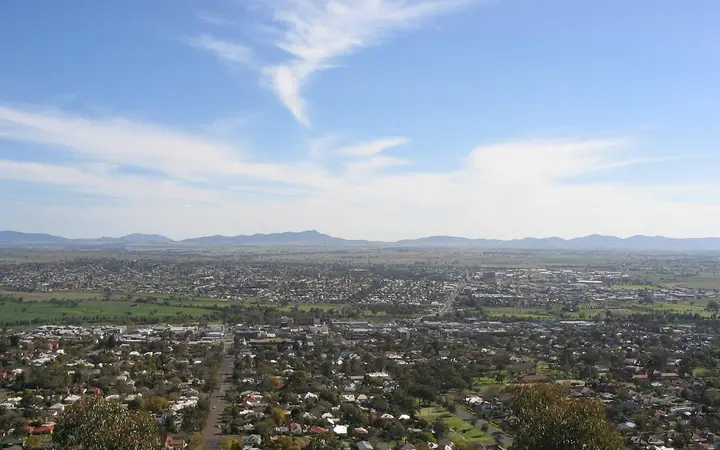
Tamworth from Oxley Lookout, where the track sets off. Photo: Felix Andrews (Floybix) · CC BY-SA 3.0 · Wikimedia Commons ↗
TAMWORTH EAST
Bushwalk the Kamilaroi Walking Track
From Oxley Scenic Lookout the Kamilaroi Walking Track winds through the bushland of Oxley Park, linking the Botanic Garden, Marsupial Park, the lookout and Flagstaff Mountain over several kilometres. Some sections are moderate and others quite challenging, so pack water and pick your stretch.
When Any day; Scenic Road up to the lookout is closed to cars from 10pm to 6am
Cost Free
Checked on the official website, 30 Sep 2026
On the water: 1 date ideas in Tamworth
TAMWORTH
Peel River loop walk, then breakfast at Hopscotch
Follow the concrete river path that loops down along the Peel River in Bicentennial Park, between the Regional Playground and the south end of Kable Avenue, then settle in at Hopscotch beside the park's fountains for breakfast. On the 2nd, 4th and 5th Saturdays the Community Saturday Markets fill the park too.
When Hopscotch every day 7am to 2:30pm; Saturday markets 8am to 1pm on the 2nd, 4th and 5th Saturdays
Cost Walk free; Hopscotch breakfasts such as the Avocado Croast $26 and Big Breakfast $38 (winter menu, when checked); 10% surcharge Sundays and public holidays
Checked on the official website, 30 Sep 2026
Can't decide? Let the deck pick your Tamworth date
Stuck for date night ideas, or for things to do together at the weekend? Instead of scrolling lists, let the deck deal you one date idea at a time. Swipe right on the ones you like, left on the ones you don't, and within a few minutes you have a shortlist to choose from, or just take the first one you both said yes to.
How it works
Swipe to decide. Each card is one date: what to do, where it is, when it's on and what it costs. Swipe right (or tap Save) to keep it, left (or Skip) to see the next.
Share it with your date. Share sends a link that opens the deck on the same card, so the other person can say yes too.
Keep the ones you like. Saved ideas stay under the deck and on the map. Sign in and they're kept in My Places on every device.
Filter by the kind of date. Food and drink, shows and music, on the water, views and climbs, making something together, or ideas for couples.
Where the date ideas come from
Every idea of ours names a real place and was checked on its official website: what it is, when it's on and what it costs, with a link to that website and the date it was checked. Ideas with an end date leave the deck once they finish. Photos come from Wikimedia Commons and are credited on each card. Mixed in are bookable tours and experiences, clearly marked, with today's prices.
Questions
Can it pick a date for us?
Yes. Swipe until one appeals, or save a few and choose between them. For a single answer, the date wheel picks one at random.
Is it free?
Yes. Many of the ideas are free too: walks, lookouts, galleries, markets and swims.
Do we need an account?
No. Saves stay in your browser; sign in only if you want them on other devices.
Date ideas in other cities
Sydney (164)Melbourne (156)Brisbane (98)Perth (85)Adelaide (78)Hobart (54)Canberra (40)Darwin (27)Cairns (37)Newcastle (43)Wollongong (44)Gold Coast (46)Townsville (40)Geelong (41)Sunshine Coast (50)Toowoomba (24)Ballarat (23)Bendigo (23)Launceston (25)Hervey Bay (16)Albury-Wodonga (22)Orange (21)Daylesford (23)Coffs Harbour (22)Bundaberg (19)Mackay (19)Rockhampton (19)Hunter Valley (25)Port Macquarie (22)Bunbury (19)Bathurst (21)Alice Springs (19)Wagga Wagga (18)Dubbo (17)Warrnambool (19)Mildura (20)Adelaide Hills (19)Barossa Valley (19)Clare Valley (13)Port Lincoln (14)Fleurieu Peninsula (20)Flinders Ranges (13)Kangaroo Island (18)Mount Gambier (15)Murray Bridge (14)the Riverland (10)Yorke Peninsula (10)Tennant Creek (10)Katherine (12)Uluru (16)Kakadu and Litchfield (10)Geraldton (11)Kalgoorlie (15)Broome (18)the Grampians (18)Echuca (10)Shepparton (8)the Macedon Ranges (7)Hamilton (7)the Wimmera (5)Gippsland (9)the High Country (11)Lakes Entrance (7)the Mornington Peninsula (17)Phillip Island (7)the Yarra Valley (13)Tasmania's East Coast (10)North West Tasmania (7)Strahan (8)the Blue Mountains (22)the Southern Highlands (11)Broken Hill (12)the Snowy Mountains (8)the Central Coast (22)Gladstone and Agnes Water (15)Longreach (9)the Whitsundays (23)
Every idea links to the place’s own website and was checked there on the date shown; times and prices change, so check before you go. Photos from Wikimedia Commons, credited on each.